




If you’re looking for a clear and comprehensive guide to transferring crypto from Binance to MetaMask and vice versa, you’ve come to the right place! This tutorial will guide you through the essential steps, with a focus on simplicity and security. MetaMask is an extremely popular decentralised wallet, while Binance is one of the largest cryptocurrency exchange platforms. Connecting them is simple if you follow the right steps.
Step 1: Set up MetaMask
- Download and install MetaMask:
Go to the official MetaMask website and install the extension for your browser or the app for your mobile device.- On Chrome, search for “MetaMask” in the Web Store.
- On mobile devices, download it from the App Store or Google Play.
- Create a wallet:
- Open MetaMask and click on Create Wallet.
- Choose a secure password.
- Save your secret phrase in a safe place. (This is essential to retrieve your wallet).
- Add the correct network:
If you are transferring tokens to Ethereum or Binance Smart Chain (BSC), add the corresponding network:- Open MetaMask, go to Settings > Networks > Add Network.
- For Binance Smart Chain, enter:
- Network name: Binance Smart Chain
- RPC URL:
https://bsc-dataseed.binance.org/ - Chain ID:
56 - Symbol:
BNB.
Step 2: Get Crypto from Binance>.
- Log in to Binance:
- Log in to Binance with your account.
- Find your wallet:
- Go to Wallet > Fiat and Spot and search for the cryptocurrency you want to transfer.
- Start the withdrawal:
- Click on Withdraw.
- Enter the address of your MetaMask wallet:
- Open MetaMask, copy your wallet address (find it by clicking on your account).
- Choose the correct network (Ethereum or BSC depending on your tokens).
- Enter the amount and confirm.
- Complete the verification:
Binance will ask you to confirm the withdrawal with an email or SMS code.

Step 3: Verify the Transfer
- Go back to MetaMask and check that the funds have arrived:
- If you do not see the tokens, click on Import Token and add the contract of the specific token.
- You can find official contracts on sites like CoinMarketCap.
Transferring Crypto from MetaMask to Binance
- Copy the Binance deposit address:
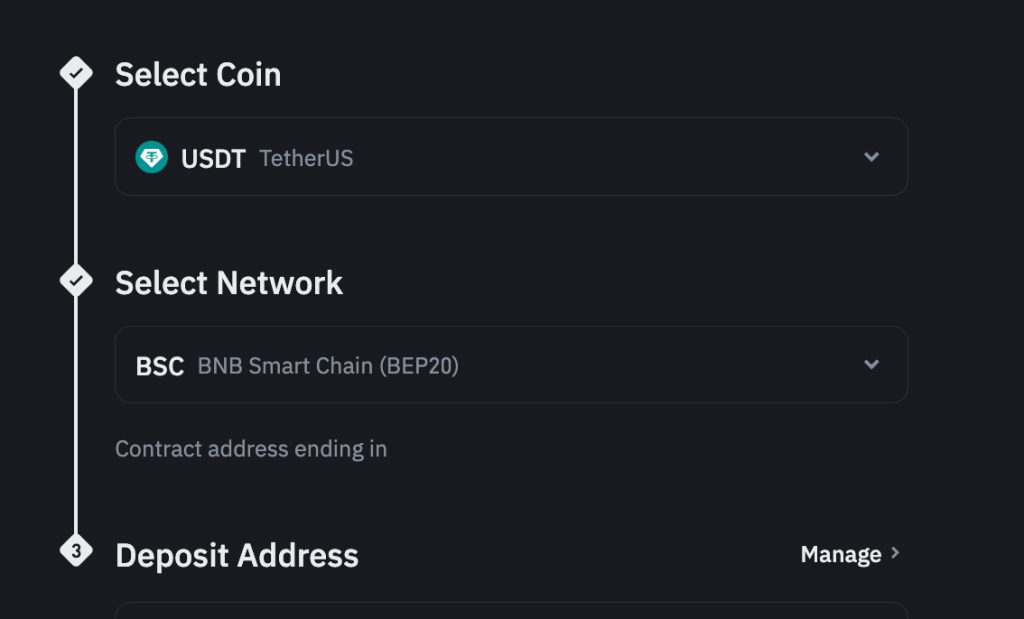
- On Binance, click on Wallet > Fiat and Spot > Deposit.
- Choose the cryptocurrency and copy the deposit address.
- Send crypto from MetaMask:
- Open MetaMask, select the token to send and click Send.
- Paste the address of Binance and check that the network is correct.
- Confirm the transaction:
- Check the details and confirm. The funds will arrive on Binance after a short wait.
Safety Tips
- Always check the network: Choose the correct network (Ethereum or BSC).
- Confirm addresses: Copy and paste to avoid mistakes.
- Save the secret phrase: Never share the MetaMask phrase with anyone.
By following these simple steps, you can easily manage your funds between Binance and MetaMask. Remember, it is always important to check the reference blockchain, the risk is to lose your funds irretrievably. In fact, the blockchain is typically a decentralised network and it is precisely because of this feature that you need to have a secure and aware management of your funds.


